Key Takeaways
- Valt is a private, all-in-one Discord management tool with a real-time web dashboard
- Manage multiple Discord servers from one dashboard, one browser tab, one login
- 14 toggleable modules plus core features: tickets, auto-mod, levels, suggestions, and more
- The dashboard streams messages live, manages tickets, and tracks stats in real time
- Every module is included, nothing is locked behind tiers. Access is by arrangement
Table of Contents
What is Valt
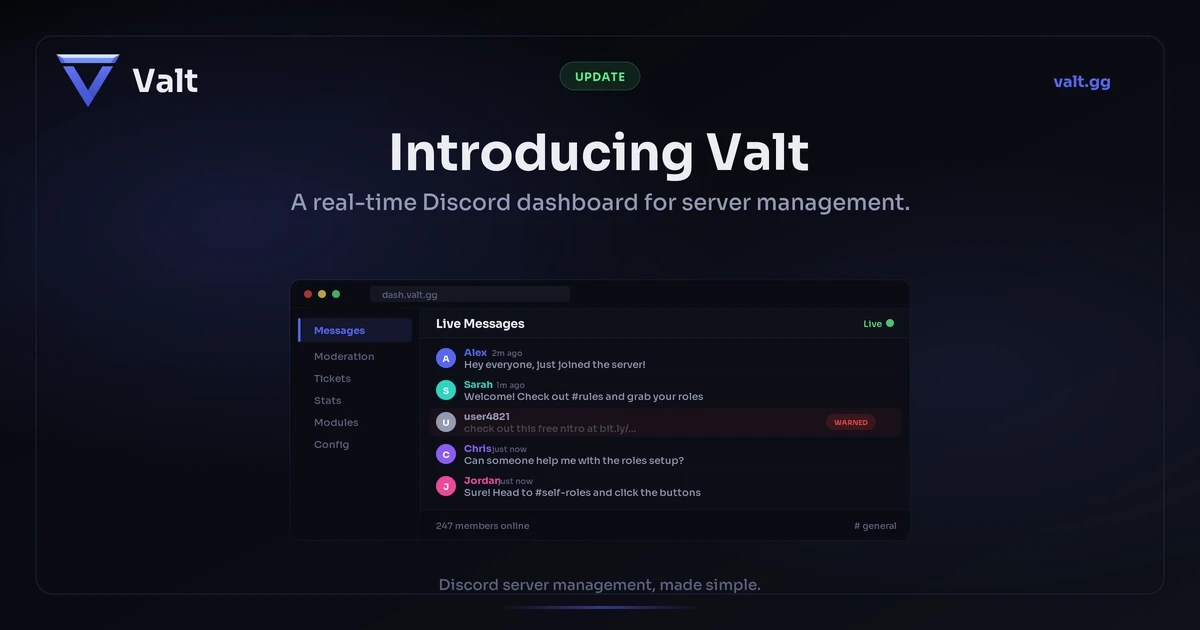
Valt is a private, all-in-one Discord management tool, a bot paired with a real-time web dashboard. Built for serious communities, it lets you manage your entire server from a clean browser interface instead of configuring everything through slash commands. Every message, every moderation action, every ticket shows up live in the dashboard the moment it happens. Valt is not a public, self-serve product. Access is by arrangement.
If you run multiple Discord servers, Valt manages all of them from a single dashboard. Switch between servers with one click. Your staff, modules, and settings are scoped per server, but you never have to log out and back in or open separate tabs. One login, all your communities.
With 14 toggleable modules covering everything from auto-moderation and tickets to levels, welcome messages, and custom commands, Valt gives you complete control over your community. Core features like moderation, stats, and admin are always available. Every module can be enabled or disabled per server, so you only run what you need. No bloat, no clutter. Just the tools your team actually uses.
Why We Built a Dashboard-First Bot
Most Discord bots are configured entirely through slash commands. That works for simple things, but it falls apart when you need to review 50 moderation cases, manage a ticket queue, or analyze server activity over the past month. Commands are great for quick actions. They are not great for managing complexity.
Valt's dashboard gives you a real-time view of your server. Messages stream in live. Moderation tools are always at your fingertips. Module configuration happens through a visual interface with toggles, dropdowns, and previews. No more typing commands to check stats or scrolling through Discord channels to find a buried ticket.
The dashboard also makes onboarding new staff easier. Instead of memorizing a list of bot commands, your moderators open a browser tab and start working. Everything is labeled, organized, and accessible. If someone can use a website, they can moderate your server.
For teams running multiple communities, this is where Valt really shines. Traditional bots force you to manage each server separately, repeating the same slash commands in each one. Valt centralizes everything. Your staff can moderate Server A, check tickets on Server B, and review stats on Server C without leaving the dashboard. One browser tab, all your servers.
What Does the Dashboard Actually Look Like
When you open the Valt dashboard, you see your server in real time. The message viewer streams every message as it happens across all your channels. Click a user to see their profile, moderation history, and activity stats. Click a message to moderate it directly: warn, mute, kick, or ban without ever opening Discord.
The ticket system turns your dashboard into a proper support desk. When a member opens a ticket in Discord, it shows up in your ticket queue instantly. Staff can respond from the browser, attach files, and close tickets with a reason. Every conversation is archived and searchable.
The stats and data explorer pages give you a complete picture of your community. Member growth charts, activity heatmaps, staff leaderboards, and message analytics are all built in. You can filter by date range, channel, or user. No third-party analytics tools needed.
Every module has its own configuration page with visual controls. Toggles, dropdowns, color pickers, and live previews replace the usual wall of slash commands. Your team can configure auto-moderation rules, set up welcome messages, or build custom embeds without memorizing a single command.
Running multiple servers? The dashboard keeps each server's data completely separate but accessible from the same session. Switch servers from the sidebar and you immediately see that server's messages, tickets, cases, and stats. Staff permissions are per-server too, so a moderator on one server does not automatically have access to another.
All 14 Modules at a Glance
Valt ships with 14 toggleable modules, each covering a different part of server management. Every module can be enabled or disabled per server, so you only run what you need. On top of that, core features like moderation, stats, and admin are always available.
- Auto-Moderation - Spam detection, word and link filters, join raid protection, and hacked account detection.
- Tickets - Button-based ticket creation with a dashboard queue. Staff respond from browser or Discord.
- Levels and XP - Message and voice XP, level-up roles, decay settings, and a public leaderboard.
- Welcome - Join and leave messages, DM greetings, and automatic role assignment for new members.
- Suggestions - Members submit ideas with /suggest. Staff review, approve, deny, or mark as implemented.
- Custom Commands - Create trigger-based responses with match modes, cooldowns, and role restrictions.
- Reaction Roles - Persistent button-based role panels with toggle or single-select modes.
- Reminders - Personal and recurring reminders with dashboard management.
- Temporary Voice Channels - Hub-based system where members create private voice channels on demand.
- Embed Builder - Visual editor for rich embeds with interactive buttons and select menus.
- Autofeed - Scheduled messages on intervals or message count triggers.
- Logging - Over 40 event types logged to Discord channels and the dashboard.
- Applications - Custom application forms with DM questionnaires and two-stage staff review.
- Feedback - DM survey campaigns targeting active, new, or churned members.
Every Valt server also includes Moderation (warn, mute, kick, ban, void cases with full case history), Stats (activity tracking, invite campaigns, staff performance), and Admin (bot configuration, staff management, system settings) as core features that are always on.
Everything Included, Nothing Locked
Valt is not a stripped-down demo with features held back. Every community on Valt gets the full toolkit: all 14 modules, including Applications and the Feedback system, plus the always-on core features for moderation, stats, and admin. Nothing is paywalled, gated, or reserved for a higher tier.
That means the real-time dashboard, message viewer, data explorer, stats pages, multiple servers, and as many staff seats as your team needs are all on the table. Logging, Tickets, Auto-Moderation, Levels and XP, Autofeed, Welcome and Goodbye messages, Custom Commands, Suggestions, Reaction Roles, Reminders, Temporary Voice Channels, and the Embed Builder are all part of the package.
Because Valt is a private tool rather than a public, self-serve product, access is by arrangement. If it sounds like a fit for your community, get in touch and we will sort out the details.
How Does Valt Compare to Other Bots
Most Discord bots are command-line tools with a settings page bolted on. MEE6, Dyno, and Carl-bot all do solid work inside Discord, but their web dashboards are limited to configuration. You change settings, save, and close the tab. There is no reason to keep it open.
Valt flips that model. The dashboard is where your staff actually work. Messages stream in live. Tickets get answered from the browser. Moderation cases are reviewed, searched, and voided from a proper interface. The bot handles Discord events. The dashboard handles everything else.
Multi-server management is another gap. Most bots treat each server as an island. If you moderate three communities, you open three Discord windows or repeat commands three times. Valt's dashboard lets you switch between all your servers from one session. Your team works from a single tab, with per-server permissions keeping everything organized.
The other difference is positioning. Many bots lock basic features behind paid tiers or limit usage with aggressive upsells. Valt is a private tool built for serious communities, so every community that gets access runs the complete feature set, including application forms and feedback campaigns. There are no tiers to compare and nothing held back.
How Access Works
Valt is a private tool, so onboarding starts with a conversation rather than a public invite link. Here is how it works:
- Request access. Reach out and tell us a little about your community. If it is a fit, Valt is added to the server you want to manage with the permissions it needs for moderation, role management, and message logging.
- Complete the setup wizard. The wizard walks you through adding staff members, enabling the modules you want, and setting an updates channel for bot notifications.
- Open the dashboard and start managing. Your server data begins syncing immediately. Messages, members, and channels appear in real time.
That is it. No config files, no environment variables, no terminal commands. Once the wizard finishes, your dashboard is live and your team can start moderating from the browser.
Frequently Asked Questions
How do I get access to Valt?
Valt is a private, all-in-one Discord management tool rather than a public, self-serve bot. Access is by arrangement. Get in touch at [email protected], tell us about your community, and if it is a fit we will set you up with the full toolkit.
How is Valt different from MEE6 or Dyno?
Valt is built around its real-time web dashboard. While other bots focus on slash commands, Valt lets you moderate, manage tickets, view messages, and configure everything from a browser. You get a complete server management interface, not just a bot.
Does Valt require any coding or technical setup?
No. Once Valt is added to your server, complete the setup wizard and you are ready. All configuration happens through the dashboard with visual controls. No commands to memorize, no config files to edit.
How many modules does Valt have?
Valt has 14 toggleable modules plus core features (moderation, stats, and admin) that are always available. Every community gets the full set, covering tickets, auto-mod, levels, welcome messages, suggestions, custom commands, reaction roles, reminders, temporary voice channels, the embed builder, autofeed, logging, applications, and feedback campaigns. Nothing is locked behind tiers.
Can I manage multiple Discord servers with Valt?
Yes. Valt's dashboard lets you manage all your servers from a single session. Switch between servers with one click to see messages, tickets, cases, and stats for each one. Staff permissions are set per server, so your team only sees what they should.
Can I use Valt alongside other Discord bots?
Yes. Valt works alongside any other bot. Its modules are fully toggleable, so you can disable anything that overlaps with your existing setup and only use the features you need.
Want Valt for your community?
Valt is a private tool, available by arrangement. Tell us about your server and we will take it from there.
Request access Get in touch